Fact sheet · Calendars & scheduling

CalendarFlow
Voice scheduling for Google Calendar
A voice-scheduling app that lets you hold a hotkey, say what you need scheduled, and add it to your Google Calendar in seconds.
Overview
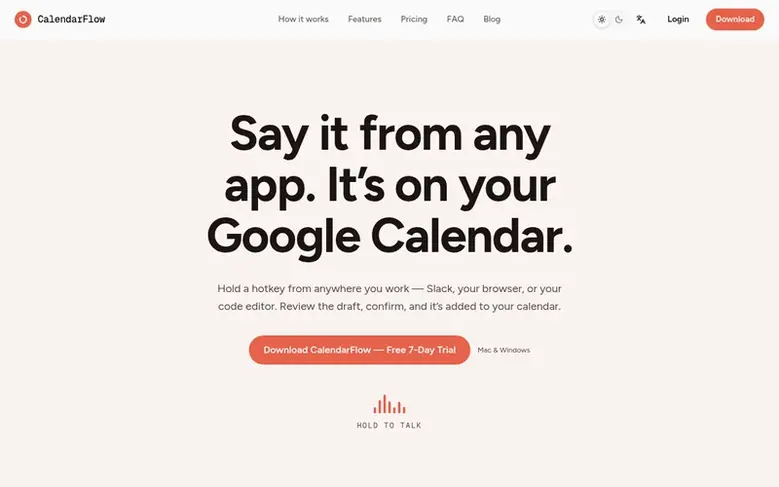
CalendarFlow is a voice-scheduling application that integrates with Google Calendar, Google Tasks, and Google Contacts. Hold a hotkey from anywhere you work—Slack, your browser, or your code editor—say what you need scheduled, and confirm the editable draft to add it to your calendar. The app handles the full lifecycle of event and task management: creating, rescheduling, and canceling events with conflict detection, recurring event support, automatic Google Meet link generation, and contact name resolution. It runs on both Mac and Windows without requiring app-switching, designed to fit seamlessly into your workflow.
Feature facts
- Natural language scheduling—say it the way you'd say it to a person
- Create events and tasks from voice
- Reschedule and cancel events by voice
- Conflict detection before events are created
- Automatic recurring event setup
- Automatic Google Meet link generation
- Contact name resolution to emails
- Editable draft confirmation before calendar changes
- Works from any app with one hotkey
- Runs on Mac and Windows
Pricing
Pricing model: Free trial
Pro — Monthly: $9/month. Pro — Yearly: $90/year (2 months free vs. monthly). 7-day free trial on both plans, no credit card required.
Follow CalendarFlow: their milestones, new launches and awards come to you by email, once a day by default.
CalendarFlow specifications
| Section | Calendars & scheduling |
|---|---|
| Website | calendarflow.io |
| Votes2 | 0 |
CalendarFlow metrics
| Metric | Value |
|---|---|
| Domain Rating | 4 +2 (up) since last check |
| Trust Flow | 1 no change since last check |
| Citation Flow | 18 no change since last check |
| Referring domains | 3 no change since last check |
| External backlinks | 4 no change since last check |
Fact: Ahrefs Domain Rating checked 12 Nov 2026, fact changed 4 Nov 2026. Fact: top topic Regional/Asia (1). Fact: Majestic checked 27 Oct 2026, fact changed 27 Oct 2026. Link facts from Majestic. Trust Flow, Citation Flow and Topical Trust Flow are trademarks of Majestic-12 Ltd.
CalendarFlow domain fact sheet
Open the fact sheet
| Domain age | 4 months |
|---|---|
| Registered | |
| Expires | |
| Registrar | HOSTINGER operations, UAB |
| DNSSEC | Not signed |
CalendarFlow launch receipt sheet
What we have measured for CalendarFlow since it went live on SaaS Directory Info on 27 October 2026.
- 4 Domain Rating (Ahrefs) +3 (up) since launch
at launch: 1 (27 Oct 2026); latest: 11 Nov 2026 - 1 Trust Flow (Majestic)
first measured 27 Oct 2026 - 3 Referring domains (Majestic)
first measured 27 Oct 2026
Day 15 since launch. Next receipt: day 30, 26 Nov 2026. The figures report a change; they do not say what caused it, and many things can. No figure here is a guess.
Got a launch coming up?
Step-by-step tips for before, during and after your launch, free to read on SaaS Directory Info.
- Prepare
- Launch day
- Launch week
- Next steps
Compare and explore
Frequently looked up
- Q1Will it accidentally create the wrong event if it mishears me?
- No. Every event or task is shown as an editable draft first. Nothing is created, changed, or canceled on your real calendar until you explicitly confirm it.
- Q2I already use Wispr Flow or Superwhisper — why do I need this too?
- Those tools turn speech into text wherever you're typing but don't understand meetings, check for calendar conflicts, or reschedule events. CalendarFlow is built specifically to take real action on your calendar and works well alongside those tools.
- Q3Is it Mac-only?
- No. CalendarFlow runs on both Mac and Windows.
- Q4Is my calendar data safe?
- CalendarFlow connects through Google's own sign-in screen, so you never hand over a password. It only requests the specific calendar, tasks, and contacts access it needs to work.
- Q5Will I be charged right away?
- No. You get 7 days free with no credit card required to start. If you want to keep using CalendarFlow after that, you subscribe from inside the app or your dashboard.
Leave a review for CalendarFlow
Review count for CalendarFlow: none yet. Add the first.
Fact: reviews are free and cannot be bought. All reviews, in brief
Reviews and facts · Fact updates · Share these facts · Your SaaS? Claim this fact file · Report a wrong fact
CalendarFlow has a free listing. The owner can unlock the full profile with a paid launch for $5:
- Founder story (locked)
- Milestones (locked)
- Demo video (locked)
- Dofollow website link (locked)
See also
| Product | Origin | DR1 | Votes2 |
|---|---|---|---|
 HourwrightAutomatic task scheduling for Google Calendar | not stated | 0 | 0 votes. Log in to vote for Hourwright in the file |
 iCalendarPrintFree printable calendars you can customize and print in seconds | not stated | 5 | 0 votes. Log in to vote for iCalendarPrint in the file |
 NBA CalendarSee NBA games in your local time with listed TV channels | not stated | 0 | 0 votes. Log in to vote for NBA Calendar in the file |
 VelpriumA time database for your calendar that turns Google Calendar into structured data with properties, filters, and review tools | South Korea | 6 | 0 votes. Log in to vote for Velprium in the file |