Fact sheet · Productivity & Personal Tools

Just Copy
The Mac clipboard manager in your notch
A clipboard manager for Mac that keeps your text, links, images and screenshots in a tray at the top of your screen, accessible with a single reach.
Overview
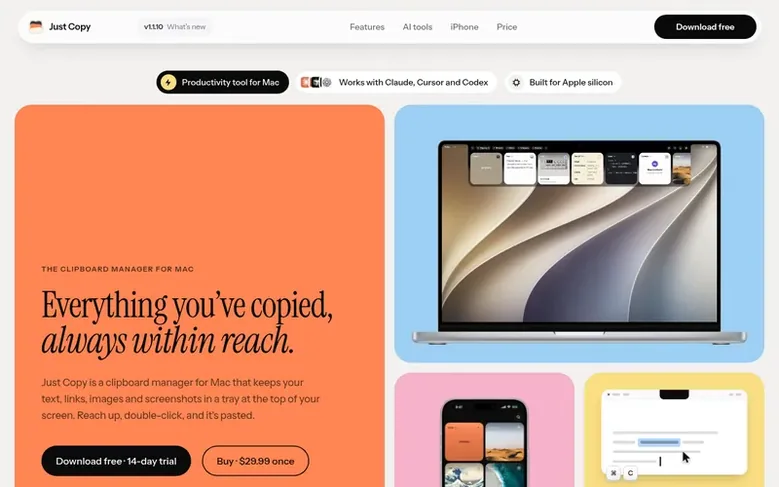
Just Copy is a clipboard manager for Mac that keeps your text, links, images and screenshots in a tray at the top of your screen. Everything you copy is stored on your Mac with no account required, and you can reach it by pointing at the notch or the top-center of your screen, then double-clicking a card or pressing its number to paste.
The app displays each copy as what it is—a link with its preview, a color as a swatch, a date as a calendar, and more. You can search everything you've ever copied, with OCR reading the words inside every screenshot. Each copy can be edited before pasting, and you can organize copies into smart folders that fill themselves based on rules.
It includes Paste Stack, which lets you copy multiple items and paste them in order with each ⌘V. You can customize the appearance with light or dark themes, solid or glass tray, and choose whether the tray lives at the notch or above your dock.
Just Copy requires an Apple silicon Mac (M1 or later) running macOS 14 or later, with no subscription—you pay once and keep the version you buy.
Feature facts
- Visual clipboard history accessible from the notch
- Search all copied content including text in screenshots via OCR
- Quick Look preview and edit before pasting
- Paste Stack to copy and paste items in order
- Smart folders that auto-fill based on rules
- Keyboard shortcuts ⌘1 to ⌘9 for rapid pasting
- Light and dark themes with solid or glass appearance
- AI tool integration over MCP with Claude, Cursor and Codex
- Local storage on Mac with optional iCloud sync
Pricing
Pricing model: Free trial
Free for 14 days, then $29.99 USD once ($49 regular price after launch). Includes every Mac feature, every 1.x update, and the iPhone app when it launches.
Follow Just Copy: their milestones, new launches and awards come to you by email, once a day by default.
Just Copy specifications
| Section | Productivity & Personal Tools |
|---|---|
| Website | justcopy.app |
| Votes2 | 0 |
Just Copy metrics
| Metric | Value |
|---|---|
| Domain Rating | 24 −2 (down) since last check |
| Trust Flow | 12 no change since last check |
| Citation Flow | 21 no change since last check |
| Referring domains | 10 no change since last check |
| External backlinks | 32 no change since last check |
Fact: Ahrefs Domain Rating checked 12 Nov 2026, fact changed 8 Nov 2026. Fact: top topic Computers/Programming/Languages (12). Fact: Majestic checked 23 Oct 2026, fact changed 23 Oct 2026. Link facts from Majestic. Trust Flow, Citation Flow and Topical Trust Flow are trademarks of Majestic-12 Ltd.
Just Copy domain fact sheet
Open the fact sheet
| Domain age | 4 months |
|---|---|
| Registered | |
| Expires | |
| Registrar | Namecheap Inc. |
| DNSSEC | Not signed |
Just Copy launch receipt sheet
What we have measured for Just Copy since it went live on SaaS Directory Info on 23 October 2026.
- 24 Domain Rating (Ahrefs) −2 (down) since launch
at launch: 26 (23 Oct 2026); latest: 11 Nov 2026 - 12 Trust Flow (Majestic)
first measured 23 Oct 2026 - 10 Referring domains (Majestic)
first measured 23 Oct 2026
Day 20 since launch. Next receipt: day 30, 22 Nov 2026. The figures report a change; they do not say what caused it, and many things can. No figure here is a guess.
Got a launch coming up?
Step-by-step tips for before, during and after your launch, free to read on SaaS Directory Info.
- Prepare
- Launch day
- Launch week
- Next steps
Compare and explore
Frequently looked up
- Q1Does it change how copy and paste work?
- No. ⌘C and ⌘V work exactly as they always have. Just Copy quietly keeps what you copy in the tray, so anything from earlier is one reach away.
- Q2Why use Just Copy instead of the built-in clipboard history?
- Just Copy adds a visual tray you can reach from the top of your screen, search inside screenshots, folders, Paste Stack and optional AI access. You also control how long your history is kept.
- Q3Will it work on my Mac?
- Just Copy requires an Apple silicon Mac (M1 or later) running macOS 14 or later. A notch is optional: on a display without one, reach for the top-center of the screen. Intel Macs aren't supported.
- Q4Can I try it before buying?
- Yes. Just Copy is free for 14 days, with every feature. After that it locks until you buy a license, $29.99 once. Everything you copied stays on your Mac.
- Q5Where is my clipboard history stored?
- On your Mac, with no Just Copy account required. Optional iCloud sync uses your own Apple account. You can exclude apps from capture, and content that an app marks as secret is skipped by default. See our privacy policy for details on previews, sync and AI sharing.
Leave a review for Just Copy
Review count for Just Copy: none yet. Add the first.
Fact: reviews are free and cannot be bought. All reviews, in brief
Reviews and facts · Fact updates · Share these facts · Your SaaS? Claim this fact file · Report a wrong fact
Just Copy has a free listing. The owner can unlock the full profile with a paid launch for $5:
- Founder story (locked)
- Milestones (locked)
- Demo video (locked)
- Dofollow website link (locked)
See also
| Product | Origin | DR1 | Votes2 |
|---|---|---|---|
 Mac NinjaMac speed-up app that unloads idle browser tabs and calms background CPU hogs without closing your apps. | Sweden | 0 | 0 votes. Log in to vote for Mac Ninja in the file |
 AuboraDesktop app that adds semantic search, face grouping, and map features to cloud storage like pCloud, Dropbox, and Infomaniak kDrive, with all processing running | not stated | 1 | 0 votes. Log in to vote for Aubora in the file |
 QuiltAutomatic window manager for Mac that arranges windows in tiles | not stated | 0 | 0 votes. Log in to vote for Quilt in the file |
 AguaFree I Ching six-line reading with three coins | not stated | 2 | 0 votes. Log in to vote for Agua in the file |