Fact sheet · Productivity & Personal Tools

Otterdock
Group apps, files, folders, and links in your Mac Dock with organized workflows
A macOS Dock organizer that lets you group apps, files, folders, and links into project workflows with desktop widgets and keyboard shortcuts.
Overview
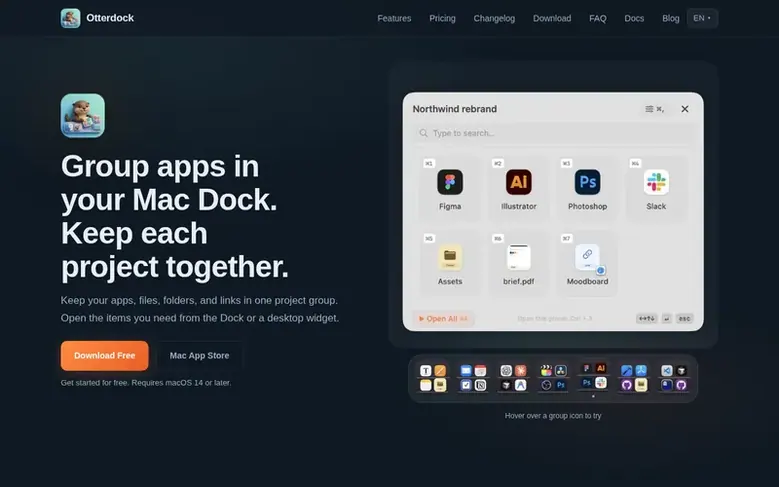
Otterdock is a macOS Dock organizer that groups apps, files, folders, and links into workflows. It replaces a crowded Dock with one icon per project, letting you open entire project workflows in a single click. The app offers two editions: Direct (with custom popups, hover expansion, and global shortcuts) and Mac App Store (using native Dock folders). Both support desktop and Notification Center widgets for quick access to individual items. You can set custom file openers for each group, use keyboard shortcuts, or click to expand groups directly from the Dock.
Feature facts
- Group apps, files, folders, and web links in one workflow
- Global keyboard shortcuts for quick group access
- Desktop and Notification Center widgets
- Custom icon skins to separate workflows
- Per-group file openers for custom app associations
- Open All button to launch entire group at once
- Hover-to-expand mode for quick access
- Type-to-search popups and arrow key navigation
- Thumbnail previews for images, PDFs, and videos
- Support for macOS 14 and newer on Intel and Apple Silicon
Pricing
Pricing model: Freemium
Free: 2 groups with 8 items each. Pro: $6.99 one-time purchase for unlimited groups and Pro skins.
Follow Otterdock: their milestones, new launches and awards come to you by email, once a day by default.
Otterdock specifications
| Section | Productivity & Personal Tools |
|---|---|
| Website | otterdock.savetimefor.fun |
| Votes2 | 0 |
Otterdock metrics
| Metric | Value |
|---|---|
| Domain Rating | 18 +2 (up) since last check |
| Trust Flow | 9 no change since last check |
| Citation Flow | 15 no change since last check |
| Referring domains | 6 no change since last check |
| External backlinks | 36 no change since last check |
Fact: Ahrefs Domain Rating checked 12 Nov 2026, fact changed 8 Nov 2026. Fact: top topic Computers/Programming/Languages (9). Fact: Majestic checked 5 Nov 2026, fact changed 5 Nov 2026. Link facts from Majestic. Trust Flow, Citation Flow and Topical Trust Flow are trademarks of Majestic-12 Ltd.
Otterdock domain fact sheet
Open the fact sheet
| Domain age | 8 months |
|---|---|
| Registered | |
| Expires | |
| Registrar | Spaceship, Inc. |
| DNSSEC | Not signed |
Otterdock launch receipt sheet
What we have measured for Otterdock since it went live on SaaS Directory Info on 5 November 2026.
- 18 Domain Rating (Ahrefs) +6 (up) since launch
at launch: 12 (5 Nov 2026); latest: 11 Nov 2026 - 9 Trust Flow (Majestic)
first measured 5 Nov 2026 - 6 Referring domains (Majestic)
first measured 5 Nov 2026
Day 6 since launch. Next receipt: day 30, 5 Dec 2026. The figures report a change; they do not say what caused it, and many things can. No figure here is a guess.
Got a launch coming up?
Step-by-step tips for before, during and after your launch, free to read on SaaS Directory Info.
- Prepare
- Launch day
- Launch week
- Next steps
Compare and explore
Frequently looked up
- Q1What is Otterdock and what does it do?
- Otterdock is a macOS Dock organizer that groups apps, files, folders, and links into workflows. The Direct edition features custom popups, hover expansion, and global shortcuts, while the Mac App Store edition uses native Dock folders. Both support desktop and Notification Center widgets.
- Q2What can I put in a group?
- You can add apps, files, folders, and links all in the same group. You can mix different item types freely, so a Design group could contain Figma, a project folder, and a reference PDF all together.
- Q3How much does Otterdock cost?
- Both editions are free to download with 2 groups and 8 items each. Pro is an optional one-time purchase for $6.99.
- Q4Can I open groups with keyboard shortcuts?
- Yes. In the Direct edition each group has its own global shortcut (Ctrl+1 to Ctrl+6 by default), and these ordinary shortcuts do not need Accessibility permission. In both editions you can also open a group from the Shortcuts app or with a link.
- Q5Which macOS versions are supported?
- The Direct Full edition supports macOS 14 and newer on Intel and Apple Silicon Macs. The Mac App Store edition supports macOS 14 and newer on Apple Silicon (M1 or newer).
Leave a review for Otterdock
Review count for Otterdock: none yet. Add the first.
Fact: reviews are free and cannot be bought. All reviews, in brief
Reviews and facts · Fact updates · Share these facts · Your SaaS? Claim this fact file · Report a wrong fact
Otterdock has a free listing. The owner can unlock the full profile with a paid launch for $5:
- Founder story (locked)
- Milestones (locked)
- Demo video (locked)
- Dofollow website link (locked)
See also
| Product | Origin | DR1 | Votes2 |
|---|---|---|---|
 Mac NinjaMac speed-up app that unloads idle browser tabs and calms background CPU hogs without closing your apps. | Sweden | 0 | 0 votes. Log in to vote for Mac Ninja in the file |
 AuboraDesktop app that adds semantic search, face grouping, and map features to cloud storage like pCloud, Dropbox, and Infomaniak kDrive, with all processing running | not stated | 1 | 0 votes. Log in to vote for Aubora in the file |
 QuiltAutomatic window manager for Mac that arranges windows in tiles | not stated | 0 | 0 votes. Log in to vote for Quilt in the file |
 AguaFree I Ching six-line reading with three coins | not stated | 2 | 0 votes. Log in to vote for Agua in the file |