Fact sheet · Productivity & Personal Tools

Teleprompter-Scrolling Scripts
Free teleprompter app for iPhone, iPad, and Mac that helps creators read scripts naturally without memorizing every line.
Free teleprompter app for iPhone, iPad, and Mac with no account, no watermark, and 1080p recording. Supports Camera mode for video recording with script
Overview
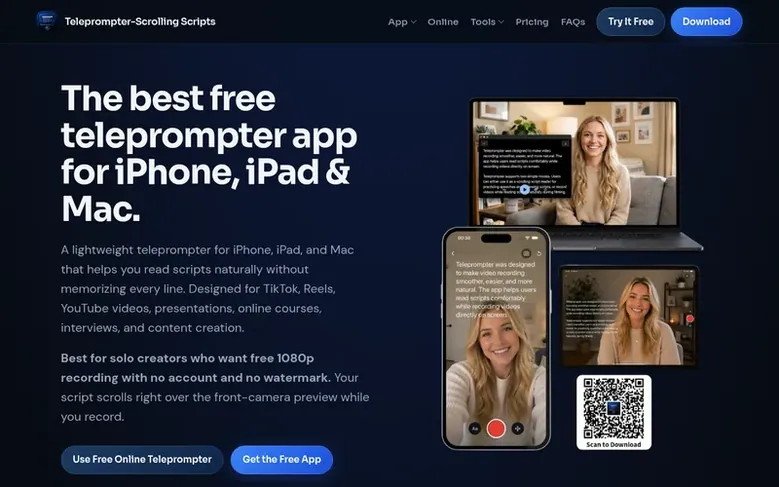
Teleprompter-Scrolling Scripts is a free, local-first teleprompter app for iPhone, iPad, and Mac designed for solo content creators. It offers three recording modes: Camera mode overlays your script on the live camera view while recording video; Prompter mode displays the script full-screen for use with external cameras, DSLRs, or Zoom calls; and Voice mode records audio only for podcasts and voiceovers. The app is fully customizable with adjustable text size, color, line spacing, text area position, and scrolling speed. All scripts are stored locally on your device with no cloud upload, no account required, and no watermark on recordings. It works offline and includes voice commands for hands-free scroll control in Prompter mode.
Feature facts
- Camera mode with script overlay for simultaneous recording and reading
- Prompter mode for external cameras and Zoom calls
- Voice mode for audio-only recording
- Fully adjustable reading layout with text size, color, and position
- Adjustable scrolling speed with WPM-based calibration
- Voice commands for hands-free scroll control
- Portrait and landscape orientation support
- Local-first storage with no cloud upload
- Works fully offline without internet connection
Pricing
Pricing model: Free
Free for all features including Camera mode, Prompter mode, Voice mode, unlimited script storage, voice control, and all text layout settings. 1080p recording with no watermark. No account required.
Follow Teleprompter-Scrolling Scripts: their milestones, new launches and awards come to you by email, once a day by default.
Teleprompter-Scrolling Scripts specifications
| Section | Productivity & Personal Tools |
|---|---|
| Founded | 2026 |
| Stage | Startup |
| Website | teleprompter.works |
| Votes2 | 0 |
Teleprompter-Scrolling Scripts metrics
| Metric | Value |
|---|---|
| Domain Rating | 27 −1 (down) since last check |
| Trust Flow | 8 no change since last check |
| Citation Flow | 26 no change since last check |
| Referring domains | 72 no change since last check |
| External backlinks | 486 no change since last check |
Fact: Ahrefs Domain Rating checked 12 Nov 2026, fact changed 5 Nov 2026. Fact: top topic Computers/Internet/On the Web (8). Fact: Majestic checked 25 Oct 2026, fact changed 25 Oct 2026. Link facts from Majestic. Trust Flow, Citation Flow and Topical Trust Flow are trademarks of Majestic-12 Ltd.
Teleprompter-Scrolling Scripts domain fact sheet
Open the fact sheet
| Domain age | 5 months |
|---|---|
| Registered | |
| Expires | |
| Registrar | Spaceship, Inc. |
| DNSSEC | Not signed |
Teleprompter-Scrolling Scripts launch receipt sheet
What we have measured for Teleprompter-Scrolling Scripts since it went live on SaaS Directory Info on 25 October 2026.
- 27 Domain Rating (Ahrefs) no change since launch
at launch: 27 (25 Oct 2026); latest: 11 Nov 2026 - 8 Trust Flow (Majestic)
first measured 25 Oct 2026 - 72 Referring domains (Majestic)
first measured 25 Oct 2026
Day 17 since launch. Next receipt: day 30, 24 Nov 2026. The figures report a change; they do not say what caused it, and many things can. No figure here is a guess.
Got a launch coming up?
Step-by-step tips for before, during and after your launch, free to read on SaaS Directory Info.
- Prepare
- Launch day
- Launch week
- Next steps
Compare and explore
- Alternatives to Teleprompter-Scrolling Scripts
- Teleprompter-Scrolling Scripts vs Stay Human
- Teleprompter-Scrolling Scripts vs CulinaMensa
- Drizzlelemons vs Teleprompter-Scrolling Scripts
- Sidebox vs Teleprompter-Scrolling Scripts
- Serenido vs Teleprompter-Scrolling Scripts
- ScriptTimer vs Teleprompter-Scrolling Scripts
- More in Productivity & Personal Tools
Frequently looked up
- Q1What is the difference between Camera mode, Prompter mode, and Voice mode?
- Camera mode records video with your script overlaid on the live camera view. Prompter mode displays scrolling text without recording anything, for use with a separate camera, a webcam, or a Zoom call. Voice mode records audio only, for podcasts, voiceovers, and singing along to lyrics.
- Q2Does the app work offline?
- Yes. The app is local-first, so you can create scripts, rehearse, and prompt without relying on a constant internet connection. All core features work fully offline including Camera mode recording, Prompter mode script display, Voice mode audio-only recording, voice scroll control, and all settings.
- Q3Do I need to create an account to use it?
- No account required. You can open the free online teleprompter or download the app and start immediately. There is no sign-up screen, no email confirmation, and no login to maintain.
- Q4Will there be a watermark on my recordings?
- No. Videos recorded in Camera mode save directly to your camera roll with no overlay, no branding, and nothing added by the app. What you record is exactly what you get — clean video, ready to upload or share.
- Q5Can I use the app for TikTok, Reels, YouTube, and online courses?
- Yes. The app is designed for short-form videos, YouTube recordings, online courses, presentations, interviews, and livestream preparation.
Leave a review for Teleprompter-Scrolling Scripts
Review count for Teleprompter-Scrolling Scripts: none yet. Add the first.
Fact: reviews are free and cannot be bought. All reviews, in brief
Reviews and facts · Fact updates · Share these facts · Your SaaS? Claim this fact file · Report a wrong fact
Teleprompter-Scrolling Scripts has a free listing. The owner can unlock the full profile with a paid launch for $5:
- Founder story (locked)
- Milestones (locked)
- Demo video (locked)
- Dofollow website link (locked)
See also
| Product | Origin | DR1 | Votes2 |
|---|---|---|---|
 Mac NinjaMac speed-up app that unloads idle browser tabs and calms background CPU hogs without closing your apps. | Sweden | 0 | 0 votes. Log in to vote for Mac Ninja in the file |
 AuboraDesktop app that adds semantic search, face grouping, and map features to cloud storage like pCloud, Dropbox, and Infomaniak kDrive, with all processing running | not stated | 1 | 0 votes. Log in to vote for Aubora in the file |
 QuiltAutomatic window manager for Mac that arranges windows in tiles | not stated | 0 | 0 votes. Log in to vote for Quilt in the file |
 AguaFree I Ching six-line reading with three coins | not stated | 2 | 0 votes. Log in to vote for Agua in the file |