Fact sheet · Productivity & Personal Tools

Backup Notion
Automatically back up your Notion workspace to cloud storage
Scheduled backups of Notion workspaces exported as Markdown and delivered to Google Drive, Amazon S3, Backblaze B2, Cloudflare R2, or Nextcloud.
Overview
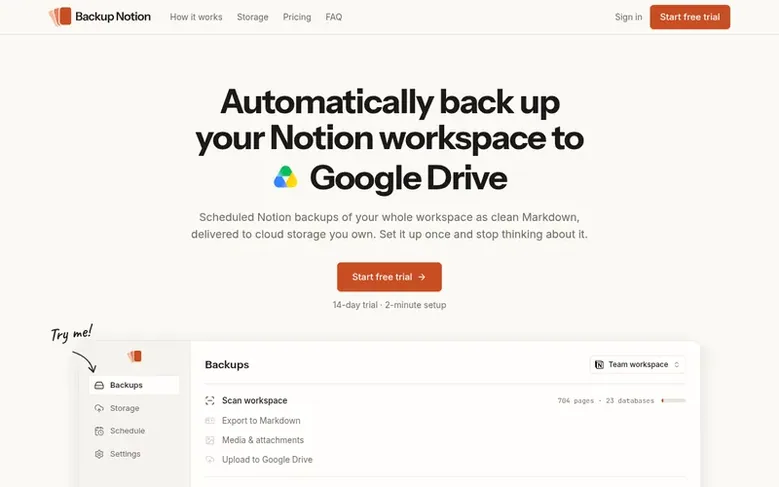
Backup Notion creates automated backups of Notion workspaces by exporting them as clean Markdown files with media and attachments, organized to mirror your workspace structure. You connect your Notion account with read-only access, choose which teamspaces to back up, and select a daily, weekly, or monthly backup schedule. The finished archive is delivered to cloud storage you already use—Google Drive, Amazon S3, Backblaze B2, Cloudflare R2, or Nextcloud—and Backup Notion deletes its copy as soon as your storage confirms the upload.
Every backup includes an HTML offline viewer with full-text search that works without Notion or an internet connection. The service is independent and not affiliated with Notion Labs, Inc.
Feature facts
- Automated daily, weekly, or monthly backups
- Export to clean Markdown format with media and attachments
- Deliver to Google Drive, Amazon S3, Backblaze B2, Cloudflare R2, or Nextcloud
- Offline HTML viewer with full-text search
- Teams plan includes comments, raw JSON export, and change log
- Automatic deletion of staged copies after 7 days if backup fails
- Single zip file delivery to storage
Pricing
Pricing model: Freemium
Personal: $9/mo billed monthly (14-day free trial); Teams: $20/mo billed monthly; Enterprise: Custom pricing. Annual billing offers 2 months free.
Follow Backup Notion: their milestones, new launches and awards come to you by email, once a day by default.
Backup Notion specifications
| Section | Productivity & Personal Tools |
|---|---|
| Website | backupnotion.to |
| Votes2 | 0 |
Backup Notion metrics
| Metric | Value |
|---|---|
| Domain Rating | 0 −1 (down) since last check |
| Trust Flow | 3 no change since last check |
| Citation Flow | 18 no change since last check |
| Referring domains | 6 no change since last check |
| External backlinks | 10 no change since last check |
Fact: Ahrefs Domain Rating checked 12 Nov 2026, fact changed 12 Nov 2026. Fact: top topic Computers/Internet/Searching (3). Fact: Majestic checked 25 Oct 2026, fact changed 25 Oct 2026. Link facts from Majestic. Trust Flow, Citation Flow and Topical Trust Flow are trademarks of Majestic-12 Ltd.
Backup Notion domain fact sheet
Open the fact sheet
| Domain age | 5 months |
|---|---|
| Registered | |
| Expires | |
| Registrar | NAMECHEAP |
| DNSSEC | Not signed |
Backup Notion launch receipt sheet
What we have measured for Backup Notion since it went live on SaaS Directory Info on 25 October 2026.
- 1 Domain Rating (Ahrefs) +1 (up) since launch
at launch: 0 (25 Oct 2026); latest: 11 Nov 2026 - 3 Trust Flow (Majestic)
first measured 25 Oct 2026 - 6 Referring domains (Majestic)
first measured 25 Oct 2026
Day 17 since launch. Next receipt: day 30, 24 Nov 2026. The figures report a change; they do not say what caused it, and many things can. No figure here is a guess.
Got a launch coming up?
Step-by-step tips for before, during and after your launch, free to read on SaaS Directory Info.
- Prepare
- Launch day
- Launch week
- Next steps
Compare and explore
Frequently looked up
- Q1Does Notion back up my data automatically?
- Notion keeps page history and a 30-day trash, but does not provide an off-platform backup. An external backup is necessary because if your account is compromised, an admin deletes a teamspace, or you lose access, version history cannot recover your data.
- Q2What format are the backups in?
- Backups are provided as clean Markdown files plus your original media and attachments, organized to mirror your workspace structure. Markdown is plain text, so any editor can open it with or without Notion.
- Q3What exactly gets backed up?
- All pages and nested subpages, databases, media files, and attachments in the teamspaces you authorize are backed up. The Teams plan also includes comments.
- Q4Do you store my Notion data on your servers?
- Your pages are staged and the archive is assembled on the servers only while a backup runs, then delivered to your storage. As soon as your storage confirms the upload, the copy is deleted. If a run fails before delivery, the staged copy is kept for up to 7 days for retry, then deleted.
- Q5Can I restore a backup into Notion?
- Restore functionality is on the roadmap. In the meantime, every backup is plain Markdown sitting in your own storage, readable and searchable with or without Backup Notion.
Leave a review for Backup Notion
Review count for Backup Notion: none yet. Add the first.
Fact: reviews are free and cannot be bought. All reviews, in brief
Reviews and facts · Fact updates · Share these facts · Your SaaS? Claim this fact file · Report a wrong fact
Backup Notion has a free listing. The owner can unlock the full profile with a paid launch for $5:
- Founder story (locked)
- Milestones (locked)
- Demo video (locked)
- Dofollow website link (locked)
See also
| Product | Origin | DR1 | Votes2 |
|---|---|---|---|
 Mac NinjaMac speed-up app that unloads idle browser tabs and calms background CPU hogs without closing your apps. | Sweden | 0 | 0 votes. Log in to vote for Mac Ninja in the file |
 AuboraDesktop app that adds semantic search, face grouping, and map features to cloud storage like pCloud, Dropbox, and Infomaniak kDrive, with all processing running | not stated | 1 | 0 votes. Log in to vote for Aubora in the file |
 QuiltAutomatic window manager for Mac that arranges windows in tiles | not stated | 0 | 0 votes. Log in to vote for Quilt in the file |
 AguaFree I Ching six-line reading with three coins | not stated | 2 | 0 votes. Log in to vote for Agua in the file |