Fact sheet · Mac & desktop utilities

FileOctopus
A native Mac file manager that works like Finder and does what Finder can't
FileOctopus is a native file manager for Mac with split panes, saved workspaces, fast search and safer file operations, keeping Finder's views and shortcuts
Overview
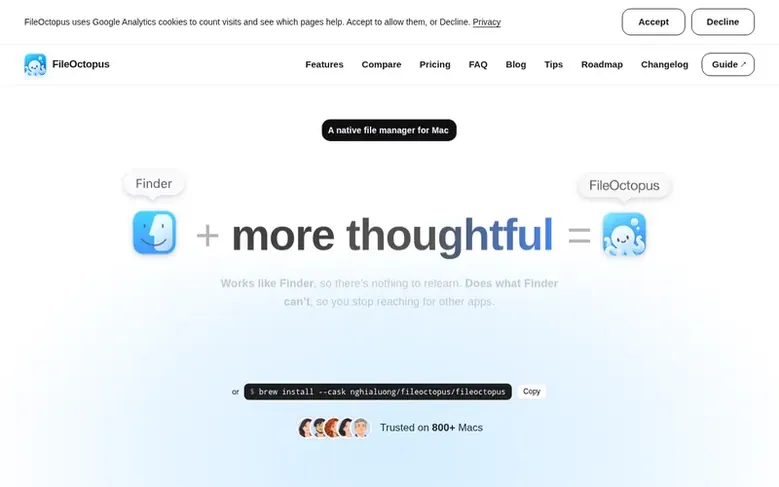
FileOctopus is a native Mac file manager that preserves Finder's familiar interface while adding split panes (up to 16 per window), named workspaces to save and restore window layouts, and safer file operations with undo that works even after quitting. It offers fast local search with plain-language queries like "PDFs from last week", optional search inside documents and images, and a File Shelf to collect files from multiple folders before copying them together. Features include remote server support via SFTP, WebDAV and S3-compatible storage, folder comparison and sync, duplicate finding, and works on macOS 15 or later on Apple Silicon without requiring a cloud account or sign-in.
Feature facts
- Split panes: up to 16 panes per window with PRO, drag files between them
- Named workspaces: save and restore window layouts with panes and tabs
- Natural-language search: type "PDFs from last week" and it becomes visible filters
- Content search: find words inside PDFs, documents and images with OCR
- File Shelf: collect files from multiple folders and copy or move them together
- Remote servers: SFTP, WebDAV, Cloudflare R2 and S3-compatible storage in panes
- Compare Folders: see differences between folders and sync changes with PRO
- Undo that persists: undo file operations even after quitting the app
- Quick Open and Command Palette: jump to folders and run menu commands from keyboard
Pricing
Pricing model: Freemium
Free forever with unlimited use and no time limit. PRO is a one-time purchase (price shown at checkout during trial) that includes all PRO features; licenses bought by November 30, 2026 include future versions at no extra cost, those bought from December 1, 2026 include 1 year of updates.
Follow FileOctopus: their milestones, new launches and awards come to you by email, once a day by default.
FileOctopus specifications
| Section | Mac & desktop utilities |
|---|---|
| Founded | 2026 |
| Origin | Vietnam |
| Stage | Startup |
| Website | fileoctopus.com |
| Makers | Max Luong (Founder) |
| Votes2 | 0 |
FileOctopus metrics
| Metric | Value |
|---|---|
| Domain Rating | 5 no change since last check |
| Trust Flow | 6 no change since last check |
| Citation Flow | 21 no change since last check |
| Referring domains | 11 no change since last check |
| External backlinks | 34 no change since last check |
Fact: Ahrefs Domain Rating checked 16 Nov 2026, fact changed 14 Nov 2026. Fact: top topic Computers/Software/Operating Systems (6). Fact: Majestic checked 14 Nov 2026, fact changed 14 Nov 2026. Link facts from Majestic. Trust Flow, Citation Flow and Topical Trust Flow are trademarks of Majestic-12 Ltd.
FileOctopus domain fact sheet
Open the fact sheet
| Domain age | 1 month |
|---|---|
| Registered | |
| Expires | |
| Registrar | NameCheap, Inc. |
| DNSSEC | Not signed |
FileOctopus launch receipt sheet
What we have measured for FileOctopus since it went live on SaaS Directory Info on 14 November 2026.
- 5 Domain Rating (Ahrefs) no change since launch
at launch: 5 (14 Nov 2026); latest: 15 Nov 2026 - 6 Trust Flow (Majestic)
first measured 14 Nov 2026 - 11 Referring domains (Majestic)
first measured 14 Nov 2026
Day 2 since launch. Next receipt: day 30, 14 Dec 2026. The figures report a change; they do not say what caused it, and many things can. No figure here is a guess.
Got a launch coming up?
Step-by-step tips for before, during and after your launch, free to read on SaaS Directory Info.
- Prepare
- Launch day
- Launch week
- Next steps
Compare and explore
Frequently looked up
- Q1Is FileOctopus a Finder alternative?
- Yes, FileOctopus is a separate file manager you can use instead of Finder for everyday file work. It does not replace the Desktop, Dock, or Open and Save dialogs, and Finder keeps running alongside it.
- Q2What happens after the 14-day trial ends?
- FileOctopus continues as Free with up to two panes per window and all file-management tools. Your files, workspaces and saved searches are kept. Features requiring PRO include saved workspaces, saved searches, queueing multiple copies, more than two panes and layouts with more than two panes.
- Q3Is FileOctopus PRO a subscription?
- No, PRO is a one-time purchase. Licenses bought by November 30, 2026 include all future versions at no extra cost. Licenses bought from December 1, 2026 include 1 year of updates; after that you can renew for $14.99 yearly or keep using the version you have.
- Q4Does FileOctopus need Full Disk Access?
- No, Full Disk Access is optional. Without it you can browse, search, copy, move and rename in every folder macOS lets you open. Full Disk Access only adds access to folders macOS hides from every app without it, such as the Trash contents and other apps' private data.
- Q5Does natural-language search use AI or send files to the cloud?
- No, supported search phrases are interpreted locally into visible, editable filters using rule-based search, not semantic AI. Core browsing and search do not require a cloud account.
Leave a review for FileOctopus
Review count for FileOctopus: none yet. Add the first.
Fact: reviews are free and cannot be bought. All reviews, in brief
Reviews and facts · Fact updates · Share these facts · Your SaaS? Claim this fact file · Report a wrong fact
FileOctopus has a free listing. The owner can unlock the full profile with a paid launch for $5:
- Founder story (locked)
- Milestones (locked)
- Demo video (locked)
- Dofollow website link (locked)
See also
| Product | Origin | DR1 | Votes2 |
|---|---|---|---|
 Stat SpaceA lean Apple Silicon menu bar monitor for developers with system stats, ports, AI agent tracking, and per-app volume control | not stated | 8 | 0 votes. Log in to vote for Stat Space in the file |
 smushAnimated cursor transitions for Mac | not stated | 2 | 0 votes. Log in to vote for smush in the file |
 DotwattBattery manager for the Mac menu bar | Georgia | 6 | 0 votes. Log in to vote for Dotwatt in the file |
| ScsDedupFind duplicate files on Windows and reclaim disk space | China | 1 | 0 votes. Log in to vote for ScsDedup in the file |