Fact sheet · Mac & desktop utilities
ScsDedup
Find duplicate files on Windows and reclaim disk space
ScsDedup scans Windows drives for duplicate files by content hash and generates a readable report showing recoverable space, without automatically deleting
Overview
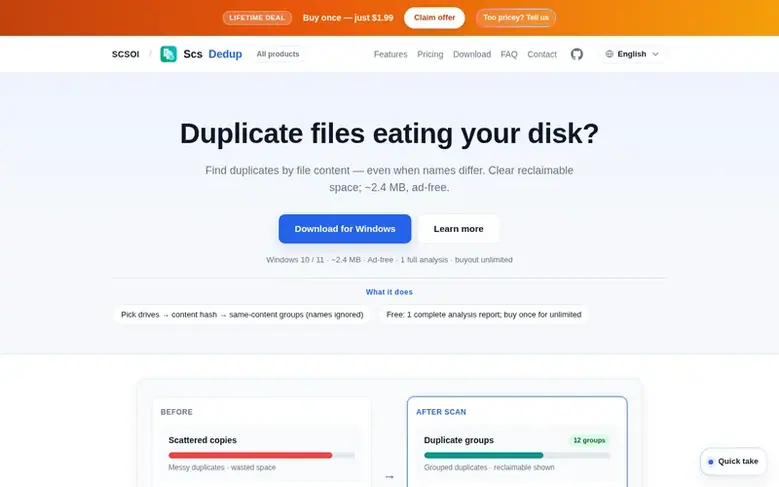
ScsDedup is a Windows utility that identifies duplicate files by analyzing content rather than filenames. Users select one or more drives to scan, and the tool groups true duplicates using SHA-256 hashing, then displays results in a detailed HTML report showing how much space can be recovered. The software prioritizes analysis and reporting—it does not delete files by default. Users can export reports in HTML or CSV format, open file directories, and copy paths to duplicates. The free version includes one complete analysis report; a lifetime license enables unlimited scans on a single PC.
Feature facts
- Content hash duplicate detection by SHA-256
- Multi-drive scan support
- HTML and CSV report export
- Sort results by recoverable space
- Open directories and copy file paths
- 8 language support including Chinese, English, Japanese, Korean, Spanish, French, German, Russian
- Email support and ongoing updates included
- Analysis-first design without automatic file deletion
- Portable and installer download options
- Lightweight at approximately 2.4 MB
Pricing
Pricing model: Freemium
Free: 1 complete analysis report. Buyout: Alipay ¥9.9 (China), Paddle $1.99 (overseas) for lifetime license.
Follow ScsDedup: their milestones, new launches and awards come to you by email, once a day by default.
ScsDedup specifications
| Section | Mac & desktop utilities |
|---|---|
| Origin | China |
| Website | dedup.scsoi.com |
| Votes2 | 0 |
ScsDedup metrics
| Metric | Value |
|---|---|
| Domain Rating | 1 +1 (up) since last check |
| Trust Flow | 0 no change since last check |
| Citation Flow | 0 no change since last check |
| Referring domains | 0 no change since last check |
| External backlinks | 0 no change since last check |
Fact: Ahrefs Domain Rating checked 12 Nov 2026, fact changed 11 Nov 2026. Fact: Majestic checked 9 Nov 2026, fact changed 9 Nov 2026. Link facts from Majestic. Trust Flow, Citation Flow and Topical Trust Flow are trademarks of Majestic-12 Ltd.
ScsDedup domain fact sheet
Open the fact sheet
| Domain age | 8 years |
|---|---|
| Registered | |
| Expires | |
| Registrar | Alibaba Cloud Computing (Beijing) Co., Ltd. |
| DNSSEC | Not signed |
ScsDedup launch receipt sheet
What we have measured for ScsDedup since it went live on SaaS Directory Info on 9 November 2026.
- 1 Domain Rating (Ahrefs) +1 (up) since launch
at launch: 0 (9 Nov 2026); latest: 11 Nov 2026 - 0 Trust Flow (Majestic)
first measured 9 Nov 2026 - 0 Referring domains (Majestic)
first measured 9 Nov 2026
Day 2 since launch. Next receipt: day 30, 9 Dec 2026. The figures report a change; they do not say what caused it, and many things can. No figure here is a guess.
Got a launch coming up?
Step-by-step tips for before, during and after your launch, free to read on SaaS Directory Info.
- Prepare
- Launch day
- Launch week
- Next steps
Compare and explore
Frequently looked up
- Q1Does ScsDedup delete my files?
- Not by default. The current version focuses on analysis and reporting. Any future delete feature will use a confirmation step and prefer the Recycle Bin.
- Q2What is the difference between free and paid versions?
- The free version provides one complete analysis report. The paid lifetime license enables unlimited scans on a single PC after purchase.
- Q3Does ScsDedup upload my files to the cloud?
- No. All analysis is performed locally on your computer and file contents are not uploaded.
- Q4Can I scan multiple drives at once?
- Yes. You can select one or multiple drives to scan simultaneously, and cancel anytime. The process uses size bucketing, sample hashing, and full SHA-256 verification.
- Q5Can I export the scan results?
- Yes. Reports can be exported as HTML or CSV files, sorted by recoverable space, with options to open folders and copy file paths.
Leave a review for ScsDedup
Review count for ScsDedup: none yet. Add the first.
Fact: reviews are free and cannot be bought. All reviews, in brief
Reviews and facts · Fact updates · Share these facts · Your SaaS? Claim this fact file · Report a wrong fact
ScsDedup has a free listing. The owner can unlock the full profile with a paid launch for $5:
- Founder story (locked)
- Milestones (locked)
- Demo video (locked)
- Dofollow website link (locked)
See also
| Product | Origin | DR1 | Votes2 |
|---|---|---|---|
 TrackEdgeSlide along the edge of your MacBook trackpad to set volume and brightness | not stated | 0 | 0 votes. Log in to vote for TrackEdge in the file |
 MoleNative Mac app for cleaning caches and AI tool data, uninstalling and updating apps, analyzing disk space, and checking system status | not stated | 38 | 0 votes. Log in to vote for Mole in the file |
 TidymintFree, open-source Mac cleaner with no tracking | not stated | 2 | 0 votes. Log in to vote for Tidymint in the file |
 QuipShotThe screenshot tool Windows always needed: fast, native, quiet, and serious about the details | United States | 8 DA 3 | 0 votes. Log in to vote for QuipShot in the file |