Fact sheet · Video & meetings

GeekLink
AI Subtitle Factory for batch video processing with OCR, transcription and translation
Desktop app that extracts burned-in subtitles via OCR, transcribes speech, and translates subtitles into 40+ languages—all processed locally on your computer
Overview
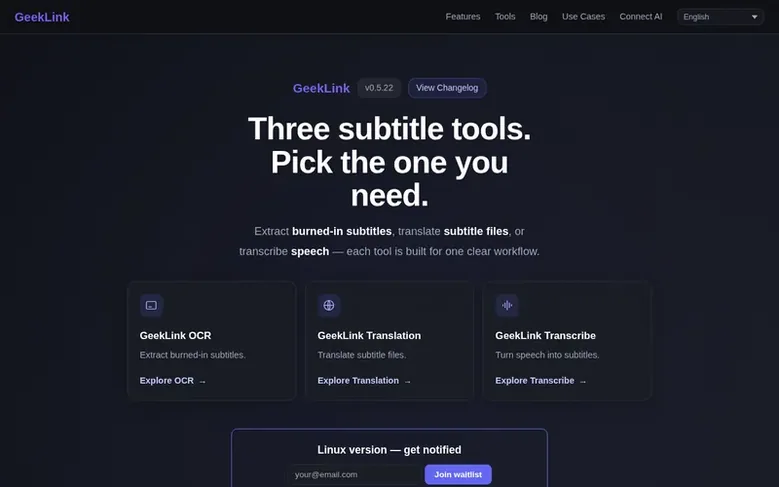
GeekLink is a desktop application for Mac and Windows that processes video subtitles locally on your computer. It offers three main workflows: OCR subtitle extraction detects hardcoded subtitles in video frames and converts them to editable SRT files; speech-to-text transcription uses AI to create subtitles from spoken audio in 40+ languages; and AI translation converts existing subtitle files between 40+ languages with context-aware translation. The app supports batch processing of multiple videos, AI line-breaking for natural subtitle formatting, and subtitle burn-in to embed translated captions directly into video files. All processing happens locally after initial model download, with no video uploads required, except for AI translation which uses cloud-based models and requires internet.
Feature facts
- OCR subtitle extraction from hardcoded video captions
- AI speech recognition in 40+ languages
- AI translation in 40+ languages
- Subtitle burn-in and export to video
- Batch processing of multiple videos
- AI line-breaking for natural subtitle formatting
- Subtitle review flagging with quality control
- Support for MP4, MOV, MKV, and AVI video formats
- Bilingual subtitle export
- Fully local processing with no video uploads
Pricing
Pricing model: Freemium
Free: permanent free tier with speech recognition, subtitle editing, batch processing, SRT/TXT export, and 60 minutes of OCR export per month. Monthly: $12.99 USD. Yearly: $99 USD. Lifetime: $129 USD.
Follow GeekLink: their milestones, new launches and awards come to you by email, once a day by default.
GeekLink specifications
| Section | Video & meetings |
|---|---|
| Origin | Sydney, United States |
| Website | geeklink.dev |
| Votes2 | 0 |
GeekLink metrics
| Metric | Value |
|---|---|
| Domain Rating | 7 +1 (up) since last check |
| Trust Flow | 10 no change since last check |
| Citation Flow | 26 no change since last check |
| Referring domains | 54 no change since last check |
| External backlinks | 3,371 no change since last check |
Fact: Ahrefs Domain Rating checked 12 Nov 2026, fact changed 12 Nov 2026. Fact: top topic Computers/Internet/Web Design and Development (10). Fact: Majestic checked 25 Oct 2026, fact changed 25 Oct 2026. Link facts from Majestic. Trust Flow, Citation Flow and Topical Trust Flow are trademarks of Majestic-12 Ltd.
GeekLink domain fact sheet
Open the fact sheet
| Domain age | 1 year |
|---|---|
| Registered | |
| Expires | |
| Registrar | CloudFlare, Inc. |
| DNSSEC | Not signed |
GeekLink launch receipt sheet
What we have measured for GeekLink since it went live on SaaS Directory Info on 25 October 2026.
- 6 Domain Rating (Ahrefs) −1 (down) since launch
at launch: 7 (25 Oct 2026); latest: 11 Nov 2026 - 10 Trust Flow (Majestic)
first measured 25 Oct 2026 - 54 Referring domains (Majestic)
first measured 25 Oct 2026
Day 17 since launch. Next receipt: day 30, 24 Nov 2026. The figures report a change; they do not say what caused it, and many things can. No figure here is a guess.
Got a launch coming up?
Step-by-step tips for before, during and after your launch, free to read on SaaS Directory Info.
- Prepare
- Launch day
- Launch week
- Next steps
Compare and explore
Frequently looked up
- Q1What is a hardcoded subtitle?
- A hardcoded subtitle is text rendered directly into a video's picture, also called a burned-in or open subtitle. It is part of the video image rather than a separate selectable subtitle track, so it cannot be turned off or edited until you extract it with OCR.
- Q2Can GeekLink extract subtitles already burned into a video?
- Yes. GeekLink OCR detects visible subtitle lines in a video and converts them into editable, time-synced SRT subtitles. It can work even when the video has no separate SRT file or usable audio track.
- Q3Can I transcribe a video that has no subtitles?
- Yes. GeekLink can transcribe speech from a video with local speech recognition, even when the video has no existing subtitles. The video needs a usable spoken-audio track; after recognition you can edit the timing and text and export an SRT.
- Q4Does GeekLink work offline?
- Speech recognition and OCR run locally after their models have been downloaded, so those workflows can run without an internet connection. AI translation needs internet because the selected translation model runs through a cloud service.
- Q5What video formats are supported?
- GeekLink supports common video formats including MP4, MOV, MKV, and AVI. MP4 or MOV is recommended for the best experience.
Leave a review for GeekLink
Review count for GeekLink: none yet. Add the first.
Fact: reviews are free and cannot be bought. All reviews, in brief
Reviews and facts · Fact updates · Share these facts · Your SaaS? Claim this fact file · Report a wrong fact
GeekLink has a free listing. The owner can unlock the full profile with a paid launch for $5:
- Founder story (locked)
- Milestones (locked)
- Demo video (locked)
- Dofollow website link (locked)
See also
| Product | Origin | DR1 | Votes2 |
|---|---|---|---|
 SwiftlookScreen sharing for phone-based sales teams without download or signup | not stated | 0 | 0 votes. Log in to vote for Swiftlook in the file |
 Auto-SubsAI subtitle translation addon for Stremio, Kodi and Nuvio | not stated | 1 | 0 votes. Log in to vote for Auto-Subs in the file |
 Wave.videoAll-in-one online video platform for creating, editing, recording, and hosting videos | United States | 76 | 0 votes. Log in to vote for Wave.video in the file |
 Green Screen RemoverBrowser-based chroma key tool for removing green or blue screen backgrounds from videos and images | not stated | 1 | 0 votes. Log in to vote for Green Screen Remover in the file |