Fact sheet · Video & meetings

Orcah Studio
Search your entire video library in plain English and jump straight to the footage you're looking for.
Local-first video search and indexing for Mac that lets you find exact moments using natural language, images, audio, and camera metadata without uploading your
Overview
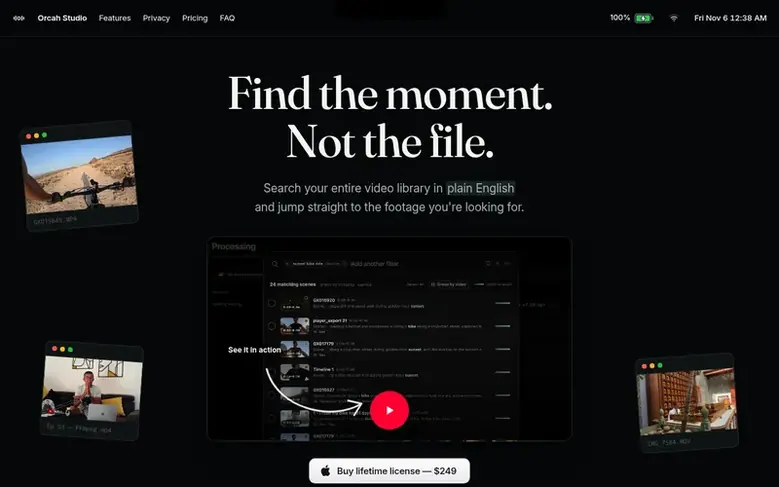
Orcah Studio is a desktop application for macOS that indexes your entire video library locally on your Mac. It lets you search for specific moments using natural language descriptions, visual matching, audio matching, and camera metadata without any files being uploaded to the cloud by default.
The app transcribes your footage with speaker identification, recognizes and labels faces, detects objects and on-screen text, analyzes scenes, and extracts camera telemetry data like focal length and color science. An AI agent can understand complex search requests like "find where Ilias explains MoviePy" and return the exact timecodes across your library.
Orcah Studio integrates directly into Final Cut Pro and DaVinci Resolve, allowing one-click handoff of clips to your timeline. It supports MP4, MOV, WebM, and MXF formats, and works with footage on internal drives, external SSDs, or networked storage. All processing happens on your machine by default, with optional cloud indexing available for speed.
Feature facts
- Natural language search across entire video library
- Automatic transcription with speaker identification
- Face recognition and labeling
- Visual match search by image
- Scene analysis and description
- Camera metadata and telemetry extraction
- Integration with Final Cut Pro and DaVinci Resolve
- GPS and Strava matching
- On-device processing with optional cloud indexing
Pricing
Pricing model: Paid
$249 one-time payment for lifetime license
Follow Orcah Studio: their milestones, new launches and awards come to you by email, once a day by default.
Orcah Studio specifications
| Section | Video & meetings |
|---|---|
| Website | orcah.app |
| Makers | Ilias Haddad (Founder, Orcah Studio) |
| Votes2 | 0 |
Orcah Studio metrics
| Metric | Value |
|---|---|
| Domain Rating | 1 +1 (up) since last check |
| Trust Flow | 2 no change since last check |
| Citation Flow | 27 no change since last check |
| Referring domains | 76 no change since last check |
| External backlinks | 235 no change since last check |
Fact: Ahrefs Domain Rating checked 12 Nov 2026, fact changed 1 Nov 2026. Fact: top topic Society/People (2). Fact: Majestic checked 25 Oct 2026, fact changed 25 Oct 2026. Link facts from Majestic. Trust Flow, Citation Flow and Topical Trust Flow are trademarks of Majestic-12 Ltd.
Orcah Studio domain fact sheet
Open the fact sheet
| Domain age | 2 months |
|---|---|
| Registered | |
| Expires | |
| Registrar | CloudFlare, Inc. |
| DNSSEC | Not signed |
Orcah Studio launch receipt sheet
What we have measured for Orcah Studio since it went live on SaaS Directory Info on 25 October 2026.
- 1 Domain Rating (Ahrefs) −1 (down) since launch
at launch: 2 (25 Oct 2026); latest: 11 Nov 2026 - 2 Trust Flow (Majestic)
first measured 25 Oct 2026 - 76 Referring domains (Majestic)
first measured 25 Oct 2026
Day 17 since launch. Next receipt: day 30, 24 Nov 2026. The figures report a change; they do not say what caused it, and many things can. No figure here is a guess.
Got a launch coming up?
Step-by-step tips for before, during and after your launch, free to read on SaaS Directory Info.
- Prepare
- Launch day
- Launch week
- Next steps
Compare and explore
Frequently looked up
- Q1Is my footage private?
- Yes. Everything is processed on-device by default, and nothing uploads unless you choose the cloud indexing option.
- Q2What Mac specs and GPU do I need?
- Orcah Studio is designed for modern Apple Silicon Macs. Recommend at least 16GB RAM and 20GB of free storage for local ML models, with enough local storage for your footage library giving the best experience.
- Q3What video formats are supported?
- Current video support includes .mp4, .mov, .webm, and .mxf (which requires DaVinci Resolve Free version for transcoding). The app will continue adding support for more formats over time.
- Q4Can I use footage stored on an external drive or NAS?
- Yes. Any drive or NAS mounted to the machine running Orcah Studio will work. If you run the self-hosted Docker version, you can also run it directly on a NAS that supports Docker with the necessary hardware.
- Q5Is Orcah Studio a standalone editor or does it work with my existing editing software?
- Orcah Studio is not a replacement for your editor — it is a companion that integrates directly into Final Cut Pro and DaVinci Resolve (Free and Studio) today, with Adobe Premiere Pro support available by request.
Leave a review for Orcah Studio
Review count for Orcah Studio: none yet. Add the first.
Fact: reviews are free and cannot be bought. All reviews, in brief
Reviews and facts · Fact updates · Share these facts · Your SaaS? Claim this fact file · Report a wrong fact
Orcah Studio has a free listing. The owner can unlock the full profile with a paid launch for $5:
- Founder story (locked)
- Milestones (locked)
- Demo video (locked)
- Dofollow website link (locked)
See also
| Product | Origin | DR1 | Votes2 |
|---|---|---|---|
 SwiftlookScreen sharing for phone-based sales teams without download or signup | not stated | 0 | 0 votes. Log in to vote for Swiftlook in the file |
 Auto-SubsAI subtitle translation addon for Stremio, Kodi and Nuvio | not stated | 1 | 0 votes. Log in to vote for Auto-Subs in the file |
 Wave.videoAll-in-one online video platform for creating, editing, recording, and hosting videos | United States | 76 | 0 votes. Log in to vote for Wave.video in the file |
 Green Screen RemoverBrowser-based chroma key tool for removing green or blue screen backgrounds from videos and images | not stated | 1 | 0 votes. Log in to vote for Green Screen Remover in the file |