Fact sheet · Mac & desktop utilities

Spacetile
Tiling window manager for macOS that arranges windows side by side on the Spaces you already use
Spacetile is a tiling window manager for macOS that automatically arranges your windows side by side without overlapping, saves setups as profiles, and applies
Overview
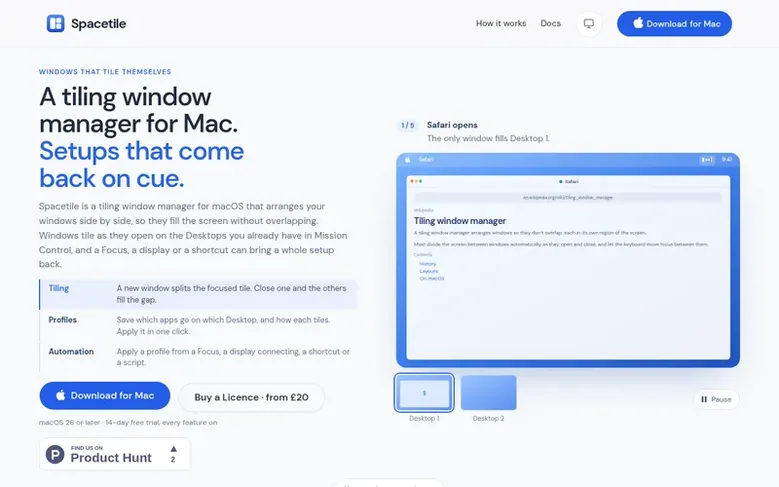
Spacetile is a tiling window manager for macOS that automatically arranges windows side by side as they open on your existing Desktops in Mission Control, so they fill the screen without overlapping. When you close a window, the others automatically fill the gap. You can drag edges to resize windows or title bars to swap them.
Profiles let you save which apps go on which Desktop and how they tile, then apply these setups in one click from the menu bar, a keyboard shortcut, a macOS Focus, a connected display or a script. Rules determine where new windows open. The app works with macOS features like full screen, Split View and the green button's Move & Resize, rather than replacing them.
Spacetile tiles each display's windows independently and keeps everything on real Spaces with no hidden off-screen workspaces. It requires macOS 26 or later and Apple silicon Macs. Every feature works free for 14 days, and a one-time licence costs £20 with 12 months of updates, or £40 for lifetime updates.
Feature facts
- Automatic tiling of windows across Desktops with Tile, Stack and Float layouts
- Profiles to save and apply window setups from the menu bar, shortcuts or Focus modes
- Drag to resize tiles and swap windows by title bar
- Rules to automatically send new windows to specific Desktops or make them float
- Keyboard shortcuts and command-line interface for all actions
- Multi-display support with independent tiling per display
- Menu bar mini-map to view all Desktops and send windows between them
Pricing
Pricing model: Paid
Licence: £20 one-time (covers updates for 12 months after purchase). Lifetime supporter: £40 one-time (covers all future updates). Renewal: £12 when desired (adds 12 months of updates). 14-day free trial with every feature included.
Follow Spacetile: their milestones, new launches and awards come to you by email, once a day by default.
Spacetile specifications
| Section | Mac & desktop utilities |
|---|---|
| Website | spacetile.app |
| Votes2 | 0 |
Spacetile metrics
| Metric | Value |
|---|---|
| Domain Rating | 0 no change since last check |
| Trust Flow | 0 no change since last check |
| Citation Flow | 0 no change since last check |
| Referring domains | 0 no change since last check |
| External backlinks | 0 no change since last check |
Fact: Ahrefs Domain Rating checked 12 Nov 2026, fact changed 30 Oct 2026. Fact: Majestic checked 30 Oct 2026, fact changed 30 Oct 2026. Link facts from Majestic. Trust Flow, Citation Flow and Topical Trust Flow are trademarks of Majestic-12 Ltd.
Spacetile domain fact sheet
Open the fact sheet
| Domain age | 1 month |
|---|---|
| Registered | |
| Expires | |
| Registrar | CloudFlare, Inc. |
| DNSSEC | Not signed |
Spacetile launch receipt sheet
What we have measured for Spacetile since it went live on SaaS Directory Info on 30 October 2026.
- 0 Domain Rating (Ahrefs) no change since launch
at launch: 0 (30 Oct 2026); latest: 11 Nov 2026 - 0 Trust Flow (Majestic)
first measured 30 Oct 2026 - 0 Referring domains (Majestic)
first measured 30 Oct 2026
Day 12 since launch. Next receipt: day 30, 29 Nov 2026. The figures report a change; they do not say what caused it, and many things can. No figure here is a guess.
Got a launch coming up?
Step-by-step tips for before, during and after your launch, free to read on SaaS Directory Info.
- Prepare
- Launch day
- Launch week
- Next steps
Compare and explore
Frequently looked up
- Q1How much does Spacetile cost?
- A Licence costs £20 one-time and covers every version released in the 12 months after purchase, plus all security fixes. A Lifetime supporter costs £40 one-time for all future updates. A Renewal adds 12 months of updates for £12. All prices include VAT and there are no subscriptions.
- Q2Is there a free trial?
- Yes. Every feature works for 14 days without a Licence. After the trial ends, tiling and profiles stop until you enter a Licence key, and your windows stay where they are.
- Q3Which version of macOS does Spacetile need?
- Spacetile requires macOS 26 or later. The app is tested on macOS 27 and only runs on Macs with Apple silicon, not Intel Macs.
- Q4What data does Spacetile send?
- Spacetile checks your Licence key on your Mac and never sends it anywhere. The app sends Kodehort nothing about you, your Mac or how you use it. The update check downloads a list of releases from updates.spacetile.app, which like any web request reveals your IP address and app version.
- Q5Can I get a refund?
- Yes. Ask within 30 days of buying a Licence, Lifetime supporter or Renewal and you get your money back in full without needing to give a reason. Email support@spacetile.app from the address you bought with.
Leave a review for Spacetile
Review count for Spacetile: none yet. Add the first.
Fact: reviews are free and cannot be bought. All reviews, in brief
Reviews and facts · Fact updates · Share these facts · Your SaaS? Claim this fact file · Report a wrong fact
Spacetile has a free listing. The owner can unlock the full profile with a paid launch for $5:
- Founder story (locked)
- Milestones (locked)
- Demo video (locked)
- Dofollow website link (locked)
See also
| Product | Origin | DR1 | Votes2 |
|---|---|---|---|
| ScsDedupFind duplicate files on Windows and reclaim disk space | China | 1 | 0 votes. Log in to vote for ScsDedup in the file |
 TrackEdgeSlide along the edge of your MacBook trackpad to set volume and brightness | not stated | 0 | 0 votes. Log in to vote for TrackEdge in the file |
 MoleNative Mac app for cleaning caches and AI tool data, uninstalling and updating apps, analyzing disk space, and checking system status | not stated | 38 | 0 votes. Log in to vote for Mole in the file |
 TidymintFree, open-source Mac cleaner with no tracking | not stated | 2 | 0 votes. Log in to vote for Tidymint in the file |