Fact sheet · Video & meetings

SuperPowerCam
Anime-style powers for your webcam, triggered by hand signs
A Windows app that adds anime-style effects to your webcam for video calls and streams, triggered by hand signs. Works with Teams, Meet, Zoom, Discord and OBS.
Overview
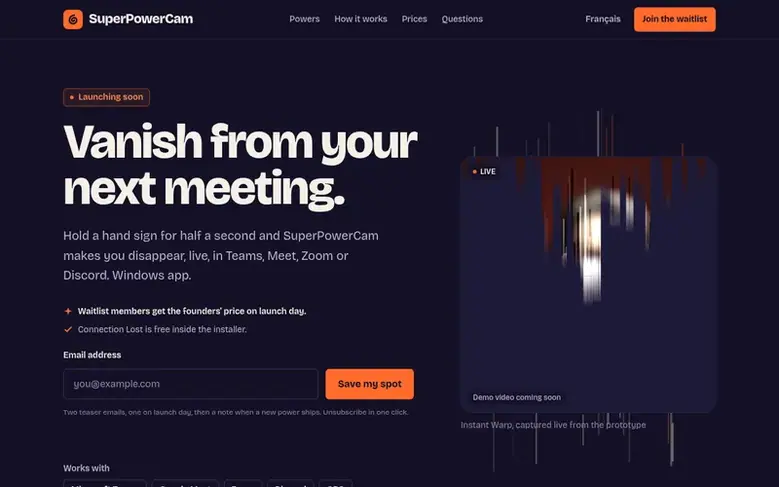
SuperPowerCam is a Windows desktop application that adds anime-style visual effects to your webcam feed. You trigger effects by holding hand signs for half a second, including powers like Instant Warp, Ninja Swap, Smoke Out and the free Connection Lost effect. The app works as a virtual camera with Microsoft Teams, Google Meet, Zoom, Discord and OBS Studio for video calls and streaming.
All processing happens locally on your PC with no cloud upload or account required. You get a licence key after purchase that works on two computers. The app includes one free power (Connection Lost) and offers paid individual powers, power packs, or a full app licence with one year of new power updates.
Feature facts
- Instant Warp effect: silhouette stretches into light streaks
- Ninja Swap effect: smoke, leaves, and log appears in chair
- Smoke Out effect: cloud of smoke swallows you
- Connection Lost effect: freezes image with reconnecting spinner
- Works with Teams, Meet, Zoom, Discord and OBS
- No graphics card required
- No green screen needed
- 14-day money-back guarantee
- Licence key works on two computers
Pricing
Free: Connection Lost power included in app. One power: $2.99. Meeting Escape pack (three powers now, two more as updates): $7.99. Full app (all powers plus one year of new releases): $14.99. Pro streamer (when available): $4.99 per month.
Follow SuperPowerCam: their milestones, new launches and awards come to you by email, once a day by default.
SuperPowerCam specifications
| Section | Video & meetings |
|---|---|
| Website | superpowercam.com |
| Votes2 | 0 |
SuperPowerCam metrics
| Metric | Value |
|---|---|
| Domain Rating | 0 no change since last check |
| Trust Flow | 0 no change since last check |
| Citation Flow | 0 no change since last check |
| Referring domains | 0 no change since last check |
| External backlinks | 0 no change since last check |
Fact: Ahrefs Domain Rating checked 16 Nov 2026, fact changed 15 Nov 2026. Fact: Majestic checked 14 Nov 2026, fact changed 14 Nov 2026. Link facts from Majestic. Trust Flow, Citation Flow and Topical Trust Flow are trademarks of Majestic-12 Ltd.
SuperPowerCam domain fact sheet
Open the fact sheet
| Domain age | 10 days |
|---|---|
| Registered | |
| Expires | |
| Registrar | NameCheap, Inc. |
| DNSSEC | Not signed |
SuperPowerCam launch receipt sheet
What we have measured for SuperPowerCam since it went live on SaaS Directory Info on 14 November 2026.
- 0 Domain Rating (Ahrefs) no change since launch
at launch: 0 (15 Nov 2026); latest: 16 Nov 2026 - 0 Trust Flow (Majestic)
first measured 14 Nov 2026 - 0 Referring domains (Majestic)
first measured 14 Nov 2026
Day 1 since launch. Next receipt: day 30, 14 Dec 2026. The figures report a change; they do not say what caused it, and many things can. No figure here is a guess.
Got a launch coming up?
Step-by-step tips for before, during and after your launch, free to read on SaaS Directory Info.
- Prepare
- Launch day
- Launch week
- Next steps
Compare and explore
Frequently looked up
- Q1How does SuperPowerCam work with video calls?
- Download the Windows installer, pick your webcam, then select SuperPowerCam as your camera in Teams, Meet, Zoom or Discord video settings. Hold a hand sign for half a second to trigger an effect live in your call with sound.
- Q2Does SuperPowerCam require an account or cloud storage?
- No. There is no account, password or cloud storage. Gesture detection, effects and the virtual camera all run on your PC. You only need your email and licence key from checkout.
- Q3Can I get a refund?
- Yes, you can get a refund within 14 days of purchase with no questions asked. Write to hello@superpowercam.com with the email you used at checkout.
- Q4Is SuperPowerCam a subscription or one-time purchase?
- It is a one-time purchase, not a subscription. Powers, packs and the full app are yours to keep. The full app includes one year of updates, and you keep the app after.
Leave a review for SuperPowerCam
Review count for SuperPowerCam: none yet. Add the first.
Fact: reviews are free and cannot be bought. All reviews, in brief
Reviews and facts · Fact updates · Share these facts · Your SaaS? Claim this fact file · Report a wrong fact
SuperPowerCam has a free listing. The owner can unlock the full profile with a paid launch for $5:
- Founder story (locked)
- Milestones (locked)
- Demo video (locked)
- Dofollow website link (locked)
See also
| Product | Origin | DR1 | Votes2 |
|---|---|---|---|
 PasteQuillFree YouTube transcript generator with timestamps, copy and download options | Hong Kong | 0 | 0 votes. Log in to vote for PasteQuill in the file |
 ScreenBuddyScreenBuddy is a Windows and Mac screen recorder with automatic zoom, cursor effects, backgrounds, captions, and local MP4 and GIF export. | not stated | 17 | 0 votes. Log in to vote for ScreenBuddy in the file |
 SwiftlookScreen sharing for phone-based sales teams without download or signup | not stated | 0 | 0 votes. Log in to vote for Swiftlook in the file |
 Auto-SubsAI subtitle translation addon for Stremio, Kodi and Nuvio | not stated | 1 | 0 votes. Log in to vote for Auto-Subs in the file |