Fact sheet · Mac & desktop utilities

TinyFolder
Custom app folders for your Mac Dock
A native app launcher that lets you group apps into custom folders in your Mac Dock with customizable designs and layouts.
Overview
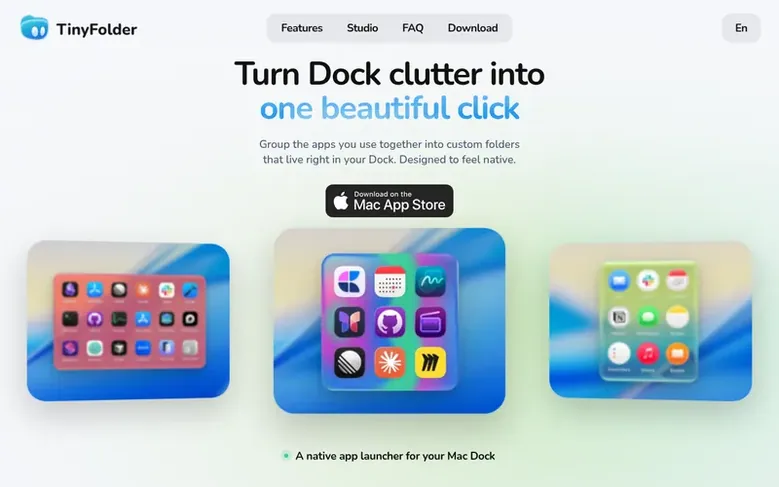
TinyFolder is a native Mac utility that lets you organize applications into custom folders that live directly in your Dock. Group apps you actually use together into a single folder with one click to open. The app offers extensive customization options including glass effects, colors, textures, and multiple layout options like icons, lists, or big tiles. You can set columns and pages, and the popup sizes itself to fit your content. TinyFolder includes 64 built-in curated presets and supports global keyboard shortcuts to open folders from anywhere. The free version includes one folder with up to four apps, while Lifetime Pro unlocks unlimited folders and apps with access to the full Design Studio and all four icon packs.
Feature facts
- Custom app folders in Dock
- Multiple layout options (icons, list, big tiles)
- 64 built-in curated presets
- Customizable glass, color and texture effects
- Live preview Design Studio
- Global keyboard shortcuts
- Opens in under 0.4 seconds
- Unlimited apps and folders with Pro
- 4 icon packs included with Pro
- Works offline
Pricing
Pricing model: Freemium
Starter: Free (1 folder with up to 4 apps). Lifetime Pro: $29.99 once (unlimited folders and apps, full Design Studio, 64 presets and 4 icon packs, global keyboard shortcuts, all future updates). 7-day money-back guarantee. Yearly Pro also available for website edition.
Follow TinyFolder: their milestones, new launches and awards come to you by email, once a day by default.
TinyFolder specifications
| Section | Mac & desktop utilities |
|---|---|
| Origin | Georgia |
| Website | tinyfolder.app |
| Votes2 | 0 |
TinyFolder metrics
| Metric | Value |
|---|---|
| Domain Rating | 20 −1 (down) since last check |
| Trust Flow | 3 no change since last check |
| Citation Flow | 21 no change since last check |
| Referring domains | 30 no change since last check |
| External backlinks | 70 no change since last check |
Fact: Ahrefs Domain Rating checked 12 Nov 2026, fact changed 6 Nov 2026. Fact: top topic Computers/News and Media (3). Fact: Majestic checked 25 Oct 2026, fact changed 25 Oct 2026. Link facts from Majestic. Trust Flow, Citation Flow and Topical Trust Flow are trademarks of Majestic-12 Ltd.
TinyFolder domain fact sheet
Open the fact sheet
| Domain age | 4 months |
|---|---|
| Registered | |
| Expires | |
| Registrar | GoDaddy.com, LLC |
| DNSSEC | Not signed |
TinyFolder launch receipt sheet
What we have measured for TinyFolder since it went live on SaaS Directory Info on 25 October 2026.
- 20 Domain Rating (Ahrefs) −1 (down) since launch
at launch: 21 (25 Oct 2026); latest: 11 Nov 2026 - 3 Trust Flow (Majestic)
first measured 25 Oct 2026 - 30 Referring domains (Majestic)
first measured 25 Oct 2026
Day 17 since launch. Next receipt: day 30, 24 Nov 2026. The figures report a change; they do not say what caused it, and many things can. No figure here is a guess.
Got a launch coming up?
Step-by-step tips for before, during and after your launch, free to read on SaaS Directory Info.
- Prepare
- Launch day
- Launch week
- Next steps
Compare and explore
Frequently looked up
- Q1What is TinyFolder?
- TinyFolder is a little app launcher that lives in your Dock. You gather the apps you actually use into one folder, design exactly how it looks with glass, color and icons, and pin it. One click opens it and launches whatever's inside.
- Q2Does TinyFolder work on my Mac?
- TinyFolder runs on macOS 13.1 and later, on Macs with Apple silicon. There is also a website edition (TinyFolder Studio) available that runs on macOS 13 and later on both Apple Silicon and Intel Macs.
- Q3Is TinyFolder safe to install?
- TinyFolder is reviewed by Apple and installed from the Mac App Store. It runs locally on your Mac and is code-signed with a Developer ID and notarized by Apple. No personal data leaves your device.
- Q4How many Macs does a license cover?
- TinyFolder Pro covers one Mac. You activate it with your email and the key, with no account needed. To move it to a new Mac, you unlink it on the old one first. Licenses bought before 22 October 2026 keep the two Macs they were sold with.
- Q5Can I get a refund?
- Yes, TinyFolder offers a 7-day, no-questions money-back guarantee. You can request a refund by emailing support.
Leave a review for TinyFolder
Review count for TinyFolder: none yet. Add the first.
Fact: reviews are free and cannot be bought. All reviews, in brief
Reviews and facts · Fact updates · Share these facts · Your SaaS? Claim this fact file · Report a wrong fact
TinyFolder has a free listing. The owner can unlock the full profile with a paid launch for $5:
- Founder story (locked)
- Milestones (locked)
- Demo video (locked)
- Dofollow website link (locked)
See also
| Product | Origin | DR1 | Votes2 |
|---|---|---|---|
| ScsDedupFind duplicate files on Windows and reclaim disk space | China | 1 | 0 votes. Log in to vote for ScsDedup in the file |
 TrackEdgeSlide along the edge of your MacBook trackpad to set volume and brightness | not stated | 0 | 0 votes. Log in to vote for TrackEdge in the file |
 MoleNative Mac app for cleaning caches and AI tool data, uninstalling and updating apps, analyzing disk space, and checking system status | not stated | 38 | 0 votes. Log in to vote for Mole in the file |
 TidymintFree, open-source Mac cleaner with no tracking | not stated | 2 | 0 votes. Log in to vote for Tidymint in the file |