Fact sheet · Video & meetings

ClipHearth
Capture your screen, convert, and edit video and sound in one desktop app.
Desktop media workbench for Windows, macOS, and Linux that captures screenshots and screen recordings, saves video and sound from web pages, then converts and
Overview
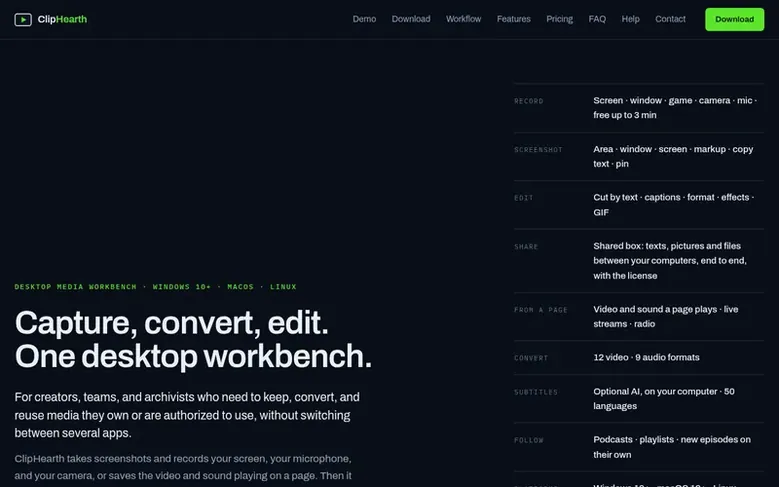
ClipHearth is a desktop media workbench that helps creators, teams, and archivists capture, convert, and edit media on their own computers. It records your screen, microphone, and camera, takes screenshots that can be marked up and searched by their text, and detects video and sound from web pages including live streams and internet radio. The built-in converter supports 11 video and 9 audio formats, with batch processing and target file size options. The editor cuts videos by editing their text, removes pauses and filler words, adds word-by-word captions, creates vertical clips, adds music and watermarks, and splits results into parts. It includes a shared box for sending files between computers encrypted end-to-end, automatic podcast following, and optional AI-powered subtitles and translation that run locally on your machine. All processing happens on your computer; it does not circumvent DRM protection.
Feature facts
- Screen recording with microphone, camera, background removal, voice clean-up, and instant replay
- Screenshot capture with markup tools (arrows, numbered steps, blur, spotlight)
- Edit videos by editing their text (cut ehms, pauses, sentences)
- Convert to 11 video and 9 audio formats with batch processing and target file size
- AI subtitles in 50 languages with optional translation
- Shared box for encrypted end-to-end file sharing between computers
- Built-in browser with stream detector for live streams and internet radio
- Follow podcasts and playlists to auto-download new episodes
Pricing
Pricing model: Freemium
€39 once for a lifetime license or €9 per month. Screenshots and screen recordings up to 3 minutes are free. Add more computers to a lifetime license for €12 each, up to 10 total.
Follow ClipHearth: their milestones, new launches and awards come to you by email, once a day by default.
ClipHearth specifications
| Section | Video & meetings |
|---|---|
| Founded | 2026 |
| Origin | Czech Republic |
| Stage | Startup |
| Website | cliphearth.com |
| Votes2 | 0 |
ClipHearth metrics
| Metric | Value |
|---|---|
| Domain Rating | 1 +1 (up) since last check |
| Trust Flow | 11 no change since last check |
| Citation Flow | 12 no change since last check |
| Referring domains | 3 no change since last check |
| External backlinks | 4 no change since last check |
Fact: Ahrefs Domain Rating checked 12 Nov 2026, fact changed 28 Oct 2026. Fact: top topic Computers/Internet/Web Design and Development (11). Fact: Majestic checked 25 Oct 2026, fact changed 25 Oct 2026. Link facts from Majestic. Trust Flow, Citation Flow and Topical Trust Flow are trademarks of Majestic-12 Ltd.
ClipHearth domain fact sheet
Open the fact sheet
| Domain age | 6 months |
|---|---|
| Registered | |
| Expires | |
| Registrar | HOSTINGER operations, UAB |
| DNSSEC | Not signed |
ClipHearth launch receipt sheet
What we have measured for ClipHearth since it went live on SaaS Directory Info on 25 October 2026.
- 1 Domain Rating (Ahrefs) +1 (up) since launch
at launch: 0 (25 Oct 2026); latest: 11 Nov 2026 - 11 Trust Flow (Majestic)
first measured 25 Oct 2026 - 3 Referring domains (Majestic)
first measured 25 Oct 2026
Day 17 since launch. Next receipt: day 30, 24 Nov 2026. The figures report a change; they do not say what caused it, and many things can. No figure here is a guess.
Got a launch coming up?
Step-by-step tips for before, during and after your launch, free to read on SaaS Directory Info.
- Prepare
- Launch day
- Launch week
- Next steps
Compare and explore
Frequently looked up
- Q1Is downloading with ClipHearth legal?
- ClipHearth is designed for media you own, created yourself, are authorized to use, or may lawfully process. The app does not circumvent DRM protection, and protected content is not supported.
- Q2Can I try ClipHearth before buying?
- Yes. The app includes a free trial with 3 tasks per device, requiring no card or account. Screenshots, screen recordings up to 3 minutes, and a Test 5 s sample never count as a task. Longer recordings, downloads, and shared box use each count as one task.
- Q3Which platforms are supported?
- ClipHearth runs on Windows 10 and later (64-bit and 32-bit), macOS 12 and later (Apple Silicon and Intel), and Linux on x64 and arm64 (.deb packages for Debian, Ubuntu, and Mint; tar.gz archives for other distributions). AI subtitles require a 64-bit system with AVX2 support.
- Q4Can I use ClipHearth on more than one computer?
- Yes, with a lifetime license. One license covers one computer, and you can add up to 9 more computers for €12 each (up to 10 total). A monthly subscription covers one computer only. Each computer in a shared box needs its own license.
- Q5Can I try it before buying?
- Yes. The app runs in trial mode with 3 free tasks per device, enough to test a download, a conversion, and an edit. Screenshots, screen recordings up to 3 minutes, and Test 5 s never count as a task. A longer recording takes one task the moment it passes 3 minutes, a download from Following is one task, and a shared box needs a license on every computer. When the third one is used up, the next click opens an offer to buy a license or to enter a key you already have, and the task carries on the moment the key is activated.
Leave a review for ClipHearth
Review count for ClipHearth: none yet. Add the first.
Fact: reviews are free and cannot be bought. All reviews, in brief
Reviews and facts · Fact updates · Share these facts · Your SaaS? Claim this fact file · Report a wrong fact
ClipHearth has a free listing. The owner can unlock the full profile with a paid launch for $5:
- Founder story (locked)
- Milestones (locked)
- Demo video (locked)
- Dofollow website link (locked)
See also
| Product | Origin | DR1 | Votes2 |
|---|---|---|---|
 SwiftlookScreen sharing for phone-based sales teams without download or signup | not stated | 0 | 0 votes. Log in to vote for Swiftlook in the file |
 Auto-SubsAI subtitle translation addon for Stremio, Kodi and Nuvio | not stated | 1 | 0 votes. Log in to vote for Auto-Subs in the file |
 Wave.videoAll-in-one online video platform for creating, editing, recording, and hosting videos | United States | 76 | 0 votes. Log in to vote for Wave.video in the file |
 Green Screen RemoverBrowser-based chroma key tool for removing green or blue screen backgrounds from videos and images | not stated | 1 | 0 votes. Log in to vote for Green Screen Remover in the file |