Fact sheet · Time tracking

Stintt
AI-powered time tracking that automatically generates timesheets from calendar events and project management tools
Stintt turns calendar and work tool events into ready-to-review timesheets with AI categorization and Excel export, requiring no manual timers or installation.
Overview
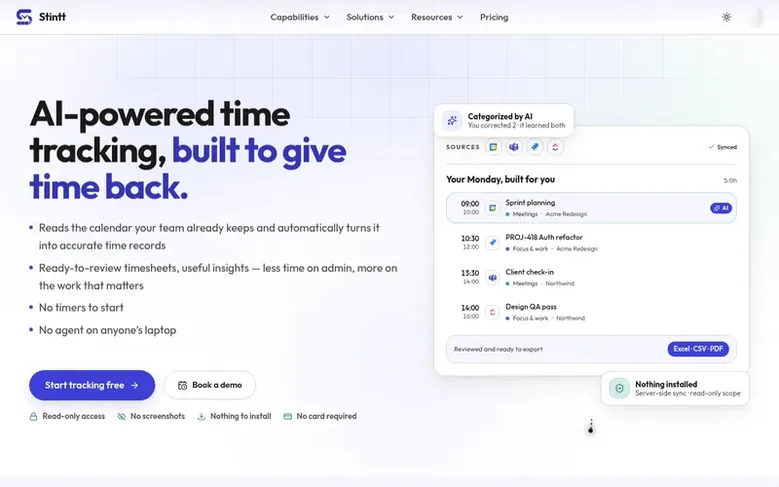
Stintt is an automatic time tracking application that reads calendar events and project management activity to generate Excel timesheets without manual data entry. The platform connects to Google Calendar, Microsoft Teams, Jira, ClickUp, and Asana to capture work activities, automatically categorizes them by AI, and exports polished timesheets in multiple formats. It includes features for team approvals, invoicing, capacity insights, and reports—all running on data already in your calendar, with no desktop agent or screenshots required. The entire process runs in a web browser with optional server-side processing for AI features and team analytics.
Feature facts
- Automatic timesheet generation from calendar events
- AI categorization of work into meetings, focus, admin, and breaks
- Export to Excel, CSV, and PDF with multiple templates
- Team approvals and review workflow
- Invoicing with tax engine and line item support
- Capacity planning and utilization insights
- Meeting cost analysis and meeting kill-list
- Chat-based time logging via Telegram and Google Chat
- Integration with Google Calendar, Microsoft Teams, Jira, ClickUp, and Asana
- Privacy by design with browser-based processing
Pricing
Pricing model: Freemium
Free plan $0/month with up to 21 days of events per export and 1 calendar source. Pro plan $9/month (or $108/year, currently 35–40% off). Workspace plan $12 per seat/month.
Follow Stintt: their milestones, new launches and awards come to you by email, once a day by default.
Stintt specifications
| Section | Time tracking |
|---|---|
| Origin | Bengaluru, India |
| Website | stintt.com |
| Votes2 | 0 |
Stintt metrics
| Metric | Value |
|---|---|
| Domain Rating | 8 no change since last check |
| Trust Flow | 1 no change since last check |
| Citation Flow | 20 no change since last check |
| Referring domains | 9 no change since last check |
| External backlinks | 24 no change since last check |
Fact: Ahrefs Domain Rating checked 12 Nov 2026, fact changed 27 Oct 2026. Fact: top topic Regional/Asia (1). Fact: Majestic checked 27 Oct 2026, fact changed 27 Oct 2026. Link facts from Majestic. Trust Flow, Citation Flow and Topical Trust Flow are trademarks of Majestic-12 Ltd.
Stintt domain fact sheet
Open the fact sheet
| Domain age | 5 months |
|---|---|
| Registered | |
| Expires | |
| Registrar | Cloudflare, Inc. |
| DNSSEC | Not signed |
Stintt launch receipt sheet
What we have measured for Stintt since it went live on SaaS Directory Info on 27 October 2026.
- 8 Domain Rating (Ahrefs) no change since launch
at launch: 8 (27 Oct 2026); latest: 11 Nov 2026 - 1 Trust Flow (Majestic)
first measured 27 Oct 2026 - 9 Referring domains (Majestic)
first measured 27 Oct 2026
Day 16 since launch. Next receipt: day 30, 26 Nov 2026. The figures report a change; they do not say what caused it, and many things can. No figure here is a guess.
Got a launch coming up?
Step-by-step tips for before, during and after your launch, free to read on SaaS Directory Info.
- Prepare
- Launch day
- Launch week
- Next steps
Compare and explore
Frequently looked up
- Q1What is Stintt?
- Stintt is an automatic time tracking app that turns calendar events and project management activity into ready-to-submit Excel timesheets with no timers to start and nothing installed on anyone's laptop. It integrates with Google Calendar, Microsoft Teams, Jira, ClickUp, and Asana, with more integrations coming soon.
- Q2Do I need to install anything to use Stintt?
- No, Stintt runs entirely in your web browser. Simply visit the website, authenticate with your calendar or project management tool, and begin generating timesheets immediately with no desktop application, browser extension, or local software to install.
- Q3Is my calendar data stored on Stintt's servers?
- By default, no. Stintt fetches calendar data directly from provider APIs to your browser and processes it locally. If you opt into AI features, event metadata is sent to Google Gemini for processing but not stored. Encrypted tokens are stored server-side only if you enable automated email reports, and synced calendar events are stored for team Workspace analytics.
- Q4What export formats does Stintt support?
- Stintt exports timesheets in Excel format compatible with Microsoft Excel, Google Sheets, Apple Numbers, and most spreadsheet applications. Both list and matrix grid layouts are supported on the Pro plan, and custom spreadsheet templates can be uploaded.
- Q5Is it free to use?
- Yes! Stintt offers a Free plan that is available indefinitely with no credit card required. The Free plan includes core timesheet generation for up to 21 days of events per export, one calendar source, standard templates, and 50,000 AI tokens per month. A paid Pro plan ($9/month or $108/year, currently 35–40% off during our launch) is available for users who require advanced features, longer date ranges, and additional integrations.
Leave a review for Stintt
Review count for Stintt: none yet. Add the first.
Fact: reviews are free and cannot be bought. All reviews, in brief
Reviews and facts · Fact updates · Share these facts · Your SaaS? Claim this fact file · Report a wrong fact
Stintt has a free listing. The owner can unlock the full profile with a paid launch for $5:
- Founder story (locked)
- Milestones (locked)
- Demo video (locked)
- Dofollow website link (locked)
See also
| Product | Origin | DR1 | Votes2 |
|---|---|---|---|
 TimeTrackerSelf-hosted time tracking and project management software | not stated | 11 | 0 votes. Log in to vote for TimeTracker in the file |
 TickarioFree time tracker for freelancers with per-client rates and no double billing | not stated | 0 | 0 votes. Log in to vote for Tickario in the file |
 Toolscase TimetrackerAI-powered time tracking for software teams with automatic screenshots and activity monitoring | not stated | 22 | 0 votes. Log in to vote for Toolscase Timetracker in the file |
 HourToBillTime tracking and invoicing for solo consultants | not stated | 0 | 0 votes. Log in to vote for HourToBill in the file |